 Telehub
How to Create a New Telegram Account
The easiest way to create a Telegram account is through the official Telegram app.
Start by downloading Telegram from the official app store for your device or from Telegram's website.
Then:
Open Telegram.
Select Start Messaging or the equivalent signup option.
Select your country.
Enter your phone number.
Continue to verification.
Enter the verification code Telegram sends you.
Enter your name.
Add a profile photo if you want one.
Finish creating your account.
Once registration is complete, you can begin messaging people, joining groups, subscribing to channels, and customizing your account.
Telegram also lets you use the same account across multiple devices, so creating a separate account for your computer isn't necessary.
Do You Need a Phone Number to Create a Telegram Account?
Yes, Telegram's standard registration process uses a phone number to create and authenticate your account.
Your phone number essentially acts as an identifier for the account during registration, but that doesn't mean you need to publicly display it to everyone you meet on Telegram.
After creating your account, Telegram provides privacy controls for determining who can see your number.
This distinction is important:
Telegram may require a phone number for registration, but other Telegram users don't necessarily need your phone number to contact you.
Once you've configured a public username, people can find you through that username instead.
Telegram explains its account and phone-number system in its official FAQ.
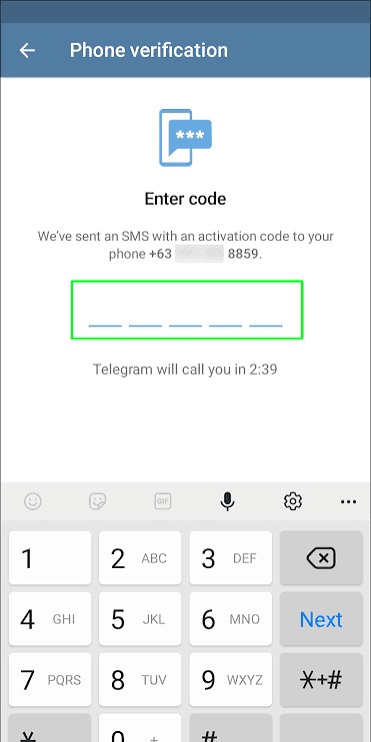
Verify Your New Telegram Account
After entering your number, Telegram needs to verify that you control it.
Follow the verification instructions shown in the app and enter the code Telegram provides.
Don't give that verification code to another person.
Someone asking you to send them a Telegram login code could be attempting to access your account. Telegram verification codes should only be entered where Telegram legitimately asks for them during authentication.
If you don't receive a code immediately, make sure:
You entered the correct number.
You selected the correct country code.
Your phone can receive the required verification method.
You haven't accidentally entered an old or inactive number.
If the phone number was previously associated with Telegram, the login process may also behave differently from a completely new registration.
Create a Telegram Username
After your account is running, one of the most useful things you can do is create a username.
A username lets other people find you without requiring you to give them your phone number.
For example:
@exampleusername
can correspond to:
t.me/exampleusername
You can then share that username or link with someone who wants to contact you.
Your username doesn't have to be identical to your display name. However, if you're using Telegram publicly, choosing something recognizable and easy to type makes your account easier to share.
If a username you want is already taken, you'll need to choose another available one.
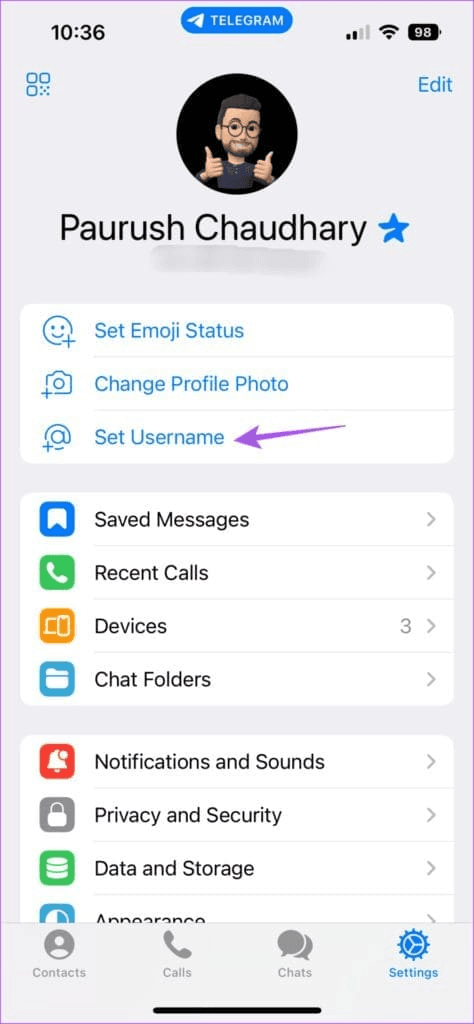
Configure Your Privacy Settings Before Using Telegram
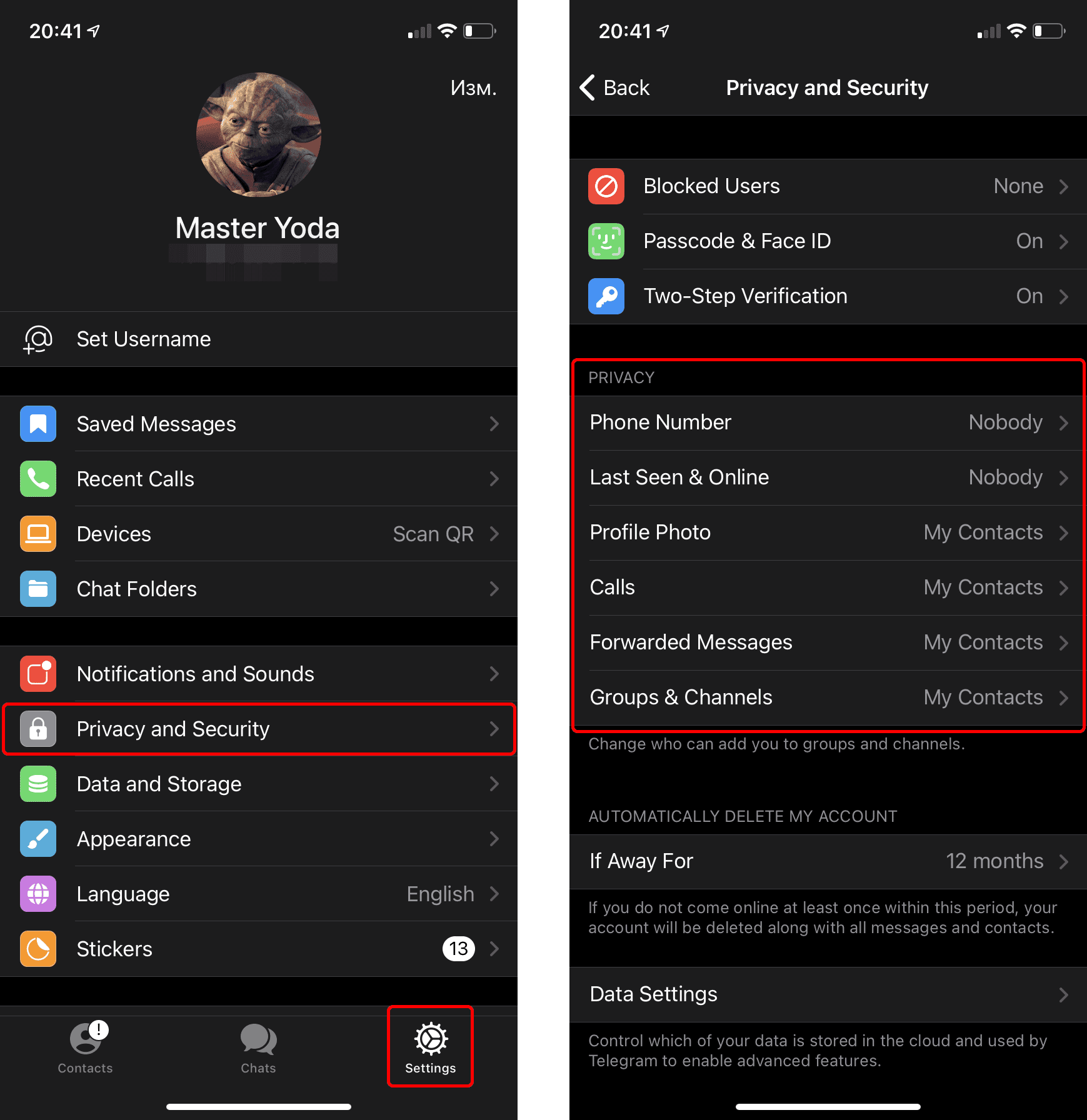
It's worth spending a minute reviewing your privacy settings before joining dozens of public communities.
Open:
Settings → Privacy and Security
Telegram provides controls for several parts of your account.
Depending on your current app version, these can include settings related to your phone number, last-seen status, profile photos, calls, forwarded messages, groups, and blocked users.
Your ideal configuration depends on how you intend to use Telegram.
Someone using Telegram exclusively with friends may be comfortable with relatively open settings.
Someone planning to participate in large public groups may want much stricter controls.
In particular, review Phone Number if you don't want people you encounter publicly to see your number.
How to Use Your Telegram Account on Another Device
You don't need to create another Telegram account every time you use a different device.
Once your account exists, you can sign into it from supported Telegram applications on your computer, tablet, or another device.
Telegram offers official applications for multiple platforms, including desktop and web clients.
Your cloud chats can then synchronize across your logged-in devices.
This means you could start a conversation on your phone and continue it from your computer.
Be careful when signing into Telegram on a shared or public computer. If someone else can access an active Telegram session, they could potentially access information from your account.
Periodically checking your active sessions is a useful security habit, particularly if you use Telegram across many devices.
What to Do After Creating Your Telegram Account
Once your account is configured, Telegram becomes much more useful when you begin finding communities and people relevant to you.
You can:
Add existing contacts.
Search for usernames.
Join Telegram groups.
Follow Telegram channels.
Create your own group.
Create your own channel.
Customize your profile.
Explore public communities.
Channels and groups serve different purposes.
Channels are primarily built for broadcasting content to subscribers.
Groups are designed around conversations between members.
If you're creating an account because you want to build an audience, you may eventually want to create a public channel and choose a recognizable username for it.
That gives the channel a shareable t.me address and makes it easier to promote outside Telegram.
Frequently Asked Questions
How do I create a new Telegram account?
Download the official Telegram app, begin registration, enter a supported phone number, complete Telegram's verification process, and enter the requested profile information.
Is creating a Telegram account free?
Yes. You can create and use a standard Telegram account without paying for Telegram Premium.
Do I need a phone number for Telegram?
Telegram's standard account-registration process uses a phone number for identification and verification.
Can everyone see my phone number after I create an account?
No. Telegram provides privacy settings that control phone-number visibility. Review Settings → Privacy and Security → Phone Number after creating your account.
Can I create a Telegram account on a computer?
Telegram offers desktop and web applications, but account creation and verification requirements can depend on the client and Telegram's current authentication flow. Using the official mobile app is generally the simplest starting point for a brand-new account.
Can I use Telegram on multiple devices?
Yes. Telegram supports using the same account across multiple devices.
Should I create a Telegram username?
You don't necessarily need one for basic use, but a username is useful because people can find and contact you without needing your phone number.
What should I do if Telegram won't let me create an account?
Double-check your phone number and country code and follow the verification instructions Telegram provides. Avoid repeatedly requesting codes in a short period if Telegram tells you to wait.
Keep reading
Related articles
More TeleHub guides connected to this topic, updated automatically as new posts are published.
Guide
How to Hide Phone Number on Telegram
Learn how to hide your phone number on Telegram, control who can find you by your number, protect your privacy, and use a username instead.

Guide
How to Add People on Telegram
Learn how to add people on Telegram using phone numbers, usernames, contacts, t.me links, and groups, including what to do when you can't find someone.

Guide
How to Get More Telegram Subscribers
Learn how to get more Telegram subscribers using valuable content, search visibility, directories, partnerships, invite-link tracking, and sustainable promotion strategies.

Guide
How to Promote a Telegram Group
Learn how to promote a Telegram group using useful discussions, social platforms, directories, partnerships, search visibility, and tracking that attracts active members.
Telehub reminder