 Telehub
1. How to Hide Your Phone Number on Telegram
Telegram includes a dedicated privacy setting for controlling who can see your phone number.
To hide it:
Open Telegram.
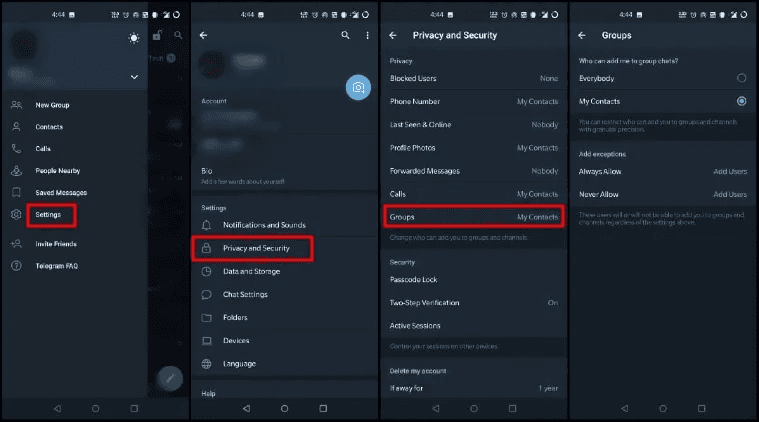
Go to Settings.
Select Privacy and Security.
Open Phone Number.
Find Who can see my phone number?
Select Nobody.
You can also configure exceptions if there are certain people who should always or never be able to see your number.
Telegram's privacy controls may vary slightly depending on your device and app version, but the phone-number settings are located within the Privacy and Security section.
If your goal is maximum phone-number privacy, Nobody is generally the setting you want.

2. Control Who Can Find You by Your Phone Number
Hiding your number and preventing people from finding you through it are related, but they aren't exactly the same thing.
Inside Telegram's Phone Number privacy settings, you'll also find:
Who can find me by my number?
This determines who can discover your Telegram account using a phone number they already have.
Depending on the options Telegram makes available to your account, you can restrict this to people who are already your contacts.
This is worth checking if you use Telegram publicly.
For example, you might participate in large public groups while still wanting your personal Telegram account to remain relatively separate from people who happen to have your phone number.
Review both settings rather than assuming that hiding your number automatically controls every method of discovering your account.
3. Can People See Your Phone Number in Telegram Groups?
Normally, joining a Telegram group does not automatically reveal your phone number to every other member.
Other users may instead see information such as your:
Display name.
Profile picture.
Username, if you have one.
Bio.
Other profile information allowed by your privacy settings.
This makes Telegram groups useful for participating in public communities without publishing your phone number to thousands of strangers.
However, your individual privacy settings and existing relationships with other users still matter.
Someone who already has your number saved may have a different relationship with your account than a complete stranger.
For that reason, it's still worth configuring your Phone Number privacy settings even if you primarily use Telegram through public groups.
4. Use a Telegram Username Instead of Your Phone Number
A username is one of the easiest ways to let people contact you without giving them your number.
For example, if your username is:
@exampleuser
you can give someone that username instead of your phone number.
You can also share:
t.me/exampleuser
Someone opening the link can reach your Telegram profile without you manually sending them your phone number.
This is particularly useful for:
Business contacts.
Online communities.
Customers.
Social media followers.
Gaming communities.
People you've never met personally.
Choose a username that you're comfortable making public because anyone who knows it may be able to search for your account.
If privacy is important, avoid putting unnecessary identifying information into the username itself.
5. Can Someone Get Your Phone Number From Your Telegram Username?
Your username and phone number are separate pieces of account information.
Giving someone your Telegram username does not automatically mean Telegram gives that person your phone number.
This is one of the major advantages of usernames.
Someone can find:
@exampleuser
send a message, and interact with that account without needing to know the phone number originally used to create it.
However, don't treat a hidden phone number as complete anonymity.
Other information can potentially identify you, including your:
Name.
Profile photo.
Bio.
Username.
Messages.
Mutual groups.
Public activity.
If you're trying to maintain separation between your public and personal identity, phone-number visibility is only one part of the privacy setup.
6. Check Your Other Telegram Privacy Settings
If you're hiding your phone number for privacy reasons, it makes sense to review the rest of Telegram's privacy controls at the same time.
Go to:
Settings → Privacy and Security
Depending on your Telegram version, you'll find controls for information and features such as:
Last Seen & Online.
Profile Photos.
Calls.
Forwarded Messages.
Groups and Channels.
Phone Number.
Blocked Users.
You don't necessarily need to make everything private.
Instead, decide what information strangers actually need.
If you operate a public Telegram community, for example, you may want a recognizable username and profile picture while keeping your personal number private.
Telegram also provides additional information about its privacy practices in its official privacy policy.
7. Test What Other People Can Actually See
After changing your settings, don't simply assume everything is configured correctly.
Check your profile from another Telegram account if you have legitimate access to one, or ask someone you trust what information appears on your profile.
Pay particular attention to:
Your phone number.
Profile picture.
Last-seen information.
Bio.
Username.
Forwarded-message attribution.
This is especially useful after changing multiple privacy settings because Telegram allows different visibility rules and exceptions.
For example, you might configure a setting for Nobody but have an exception allowing certain contacts to see that information.
Testing your profile gives you a much clearer picture of what strangers actually see.
Remember that hiding your phone number doesn't erase information you've already voluntarily shared elsewhere. If you've previously posted your number publicly, changing Telegram's visibility settings won't remove those external copies.
8. Frequently Asked Questions
Can you hide your phone number on Telegram?
Yes. Go to Settings → Privacy and Security → Phone Number and change who can see your phone number. Selecting Nobody provides the most restrictive visibility setting.
Can I use Telegram without showing my phone number?
Yes. Telegram requires a number for account registration, but you can restrict who is able to see that number through your privacy settings.
Can strangers see my phone number on Telegram?
Your phone-number visibility depends on your privacy settings and other factors such as whether someone is already one of your contacts. Review the Phone Number section under Privacy and Security.
Can people in Telegram groups see my number?
Simply being in the same group does not mean every member automatically gets access to your phone number. Your privacy settings still determine what information is visible.
Can I give someone my Telegram without giving them my number?
Yes. Create a Telegram username and give them your @username or t.me/username link instead.
Does hiding my Telegram number make me anonymous?
No. Your username, profile photo, name, bio, messages, mutual groups, and other information may still reveal your identity.
Why can someone still see my phone number after I hid it?
Check your privacy exceptions and whether the person already has your number. Your relationship with that user and your configured exceptions can affect what they see.
Should I hide my phone number on Telegram?
If you participate in public groups, communicate with strangers, or publish your Telegram username online, restricting phone-number visibility can provide useful additional privacy.
Telehub reminder